


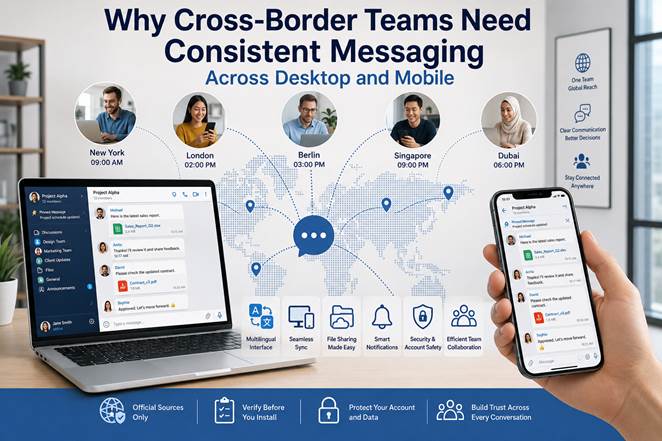
Cross-border teams depend on messaging platforms for much more than casual conversation. Employees use them to coordinate projects, exchange files, clarify deadlines, manage customer issues, and maintain continuity across offices, time zones, and languages.
The challenge is that international teams rarely work from a single device or in a single environment. Some employees spend most of the day on Windows computers, while others rely on mobile phones during travel, field work, or client meetings. Team members may also use different interface languages, notification preferences, and security settings.
Without a consistent communication workflow, even a widely adopted messaging platform can become a source of confusion. Important messages may be missed, files may be stored in the wrong place, account access may be interrupted, and employees may use inconsistent settings across devices.
Businesses therefore need to evaluate communication tools as part of their wider operational infrastructure. The goal is not simply to select an application with many features. It is to create a dependable messaging environment that supports multilingual users, desktop and mobile continuity, secure account access, and efficient teamwork.
The Communication Challenges Facing Cross-Border Teams
A team working across several countries faces communication problems that do not usually affect a single-office business.
Time-zone differences can delay decisions. Language differences can make instructions harder to interpret. Employees may use different device types, operating systems, and network conditions. Some team members may be working from an office, while others are connecting from home, airports, hotels, or customer locations.
These conditions create several practical risks.
Information becomes fragmented
Employees may discuss one project across several private chats, group channels, email threads, and document comments. When information is spread across too many locations, team members may struggle to identify the latest instruction or approved decision.
Mobile and desktop activity becomes disconnected
An employee may read a message on a phone but forget to follow up when returning to a Windows computer. Another employee may upload a file from a desktop device but be unable to review it properly on mobile.
Language settings create inconsistent user experiences
A multinational company may have employees who are comfortable using different interface languages. If the platform does not support localization well, employees may misinterpret menus, privacy options, or account settings.
Notifications become disruptive
When teams operate across multiple time zones, messages may arrive throughout the day and night. Without clear notification rules, employees can experience constant interruptions or miss urgent updates.
Account security becomes more complicated
International teams may access accounts from different locations and networks. This can trigger verification requests, create confusion about active sessions, or increase the risk of unauthorized access.
A reliable messaging workflow needs to address these issues systematically rather than relying on individual habits.
Why Multilingual Interfaces Matter
Language support is often treated as a convenience, but for international teams it can directly affect productivity and security.
Employees should be able to understand navigation menus, privacy controls, group settings, notification options, and verification prompts. When users are forced to work in an unfamiliar interface language, they are more likely to make mistakes or avoid using important features.
For example, a team member may accidentally mute an important group, misunderstand an account warning, or fail to review active device sessions because the setting is not clearly understood.
Businesses evaluating communication tools should therefore consider:
· Which interface languages are available
· Whether translations are consistent across desktop and mobile
· Whether security prompts are localized
· Whether employees can change the interface language independently
· Whether help documentation exists for multilingual users
· Whether language changes affect message history or account access
Resources related to telegram 中文版 may be useful when Chinese-speaking employees are reviewing localized communication environments, but businesses should still evaluate the platform according to their own security, compatibility, and collaboration requirements.
A localized interface is most effective when combined with clear internal guidance. Companies should document which settings employees are expected to use, how groups should be named, and where important project information should be stored.
Desktop and Mobile Message Synchronization
Cross-device continuity is one of the most important requirements for modern communication platforms.
Employees may begin a conversation on a Windows computer, continue it on a mobile phone during travel, and return to the desktop version later. The message history, shared files, group membership, and account state should remain consistent across these transitions.
A reliable synchronization experience should support:
· Continuous access to message history
· Consistent group and channel membership
· File availability across devices
· Read-status continuity
· Draft preservation where supported
· Clear identification of active sessions
· Predictable notification behavior
Businesses should test synchronization with real workplace scenarios.
For example, an employee might receive a customer update on mobile, forward a document to a project group, and later review the full conversation from a Windows computer. The workflow should not require repeated downloads, manual message forwarding, or separate account setups.
When configuring localized interfaces, employees may consult information related to telegram 中文设置 as part of understanding language and environment preferences. However, the business should also standardize broader settings such as notification behavior, session security, file handling, and account recovery.
The objective is to ensure that device changes do not interrupt work or create duplicate communication processes.
File Sharing and Team Communication
Messaging platforms are often used as informal document systems. Teams share contracts, spreadsheets, presentations, images, reports, and customer files directly inside conversations.
This can be efficient, but only when the business has clear rules.
Without structure, employees may upload several versions of the same document, use unclear file names, or store important records only inside a chat history. That can make documents difficult to retrieve later and may create compliance or backup problems.
A better process is to separate communication from long-term document storage.
Messaging tools can be used for:
· Fast review requests
· Small working files
· Screenshots and visual references
· Temporary drafts
· Links to shared documents
· Customer updates
· Project status notifications
Formal storage systems should be used for:
· Signed contracts
· Approved financial documents
· Final project files
· Employee records
· Sensitive customer information
· Documents subject to retention requirements
Teams should also follow a consistent file-naming convention. A file called final_version_new2.pdf provides little useful information. A clearer structure might be:
Client_Project_Document_2026-07-11_v04.pdf
When a file is revised, the team should either replace the shared source document or clearly identify which version is current.
This reduces the risk of employees acting on outdated information.
Notification Management Across Different Time Zones
Notifications help teams respond quickly, but poorly managed alerts can reduce concentration and create unnecessary stress.
Cross-border teams need a balance between availability and focus.
A company operating across Asia, Europe, and North America may have active conversations around the clock. Employees should not be expected to respond immediately to every message outside working hours unless the issue is genuinely urgent.
A practical notification policy may define:
· Standard response times
· Urgent message procedures
· Quiet hours
· Group-specific notification rules
· Escalation channels
· When direct messages are appropriate
· When email or project-management tools should be used instead
Teams can also classify communication spaces by purpose.
· General announcements
· Project-specific groups
· Customer-support escalation
· Regional operations
· Management discussions
· Social or non-urgent communication
Employees should be encouraged to mute non-essential groups while keeping critical operational channels active.
Managers also need to avoid using messaging activity as the only measure of responsiveness. International employees may be working effectively even when they are not immediately available in every group.
Clear expectations are more reliable than constant notifications.
Security and Account Verification
Business messaging accounts contain valuable information. Even when the platform is not used for highly confidential documents, conversations may reveal customer names, internal decisions, project schedules, payment details, or employee information.
Companies should therefore establish minimum account-security requirements.
· Strong, unique passwords where applicable
· Two-step or multi-factor verification
· Regular review of active sessions
· Immediate removal of unknown devices
· Secure account-recovery information
· Restrictions on account sharing
· Procedures for lost or stolen phones
· Offboarding steps when an employee leaves
Employees should also understand that account verification codes must never be shared with colleagues, vendors, or support agents.
International travel can create additional challenges. Login attempts from new countries or networks may trigger security checks. Employees should know how to verify legitimate prompts and how to report suspicious activity.
Public Wi-Fi networks should be treated carefully. Employees handling sensitive business discussions should use secure networks or approved corporate security tools.
Account security should be considered part of the communication workflow, not a separate technical issue.
Verifying Official Software Sources
A reliable messaging environment begins with trustworthy software.
Employees may search for desktop or mobile versions using different languages and regional search terms. This creates opportunities for fake download pages, copied websites, misleading advertisements, and modified installers.
Before installing or updating a messaging application, users should verify:
· The identity of the publisher
· The website domain
· Whether the connection uses HTTPS
· Whether the application is available through a recognized app store
· The permissions requested during installation
· The software version and update history
· Whether the installer includes unrelated applications
Businesses should maintain an approved software list and provide employees with verified access instructions.
Unapproved installers can create several risks:
· Malware infection
· Account theft
· Unauthorized data collection
· Unwanted browser extensions
· Modified update mechanisms
· Exposure of business conversations
Employees should avoid third-party download pages that use multiple misleading buttons or offer unofficial enhanced versions of communication tools.
When in doubt, users should confirm the source with the company’s IT contact or designated administrator before installation.
How Businesses Evaluate Communication Tools
A business should evaluate messaging platforms through controlled testing rather than relying only on marketing claims.
A pilot group can test the platform across several real scenarios.
Multilingual usability
Employees using different languages should confirm that menus, notifications, and account settings are understandable.
Windows and mobile continuity
The same account should be tested across desktop and mobile to confirm message synchronization, file access, and session management.
Group communication
Teams should test group creation, permissions, member management, pinned messages, and announcement workflows.
File handling
The business should review file-size limits, preview behavior, retention, download controls, and compatibility across devices.
Notification management
Employees should test quiet hours, muted groups, mentions, direct messages, and urgent alerts.
Security
The pilot should include session review, verification settings, recovery procedures, and lost-device response.
Administrative fit
The company should determine who manages group structures, employee access, naming standards, and offboarding.
Cost and scalability
The tool should remain practical as the number of employees, projects, customers, and devices increases.
A communication platform should support business processes rather than force the business to change every process around the tool.
A Practical Cross-Border Messaging Checklist
Before standardizing a communication platform, businesses should confirm the following:
1. Multilingual interfaces are available. Employees can navigate settings and security options in familiar languages.
2. Windows and mobile versions remain synchronized. Messages, files, and groups are available across devices.
3. Group structures are clearly defined. Employees know which conversations belong in which channels.
4. File-sharing rules are documented. Final business records are stored outside chat when necessary.
5. Notification expectations are realistic. Teams understand response times, urgent channels, and quiet hours.
6. Account security is standardized. Verification, recovery, and session-review practices are required.
7. Software sources are approved. Employees know where legitimate desktop and mobile applications should be obtained.
8. Employee access is reviewed regularly. Former employees and inactive devices are removed promptly.
9. Managers monitor workflow quality. The business reviews whether information is easy to find and whether important messages are being missed.
10. The platform supports future growth. The communication system can accommodate new teams, regions, and projects without becoming disorganized.
Final Thoughts
Consistent messaging across desktop and mobile devices is essential for cross-border teams.
The strongest communication systems are not built around a single feature. They combine multilingual usability, reliable synchronization, structured group communication, secure account management, controlled file sharing, and sensible notification policies.
Businesses should treat messaging platforms as part of their operational infrastructure. A clear workflow reduces delays, prevents information loss, supports remote employees, and helps international teams work together without unnecessary complexity.
When communication remains consistent across devices, languages, and time zones, employees can focus less on managing tools and more on completing the work that matters.





 Facebook
 Twitter
 YouTube