


Finance teams do not usually get hurt by a polished demo. They get hurt when a reusable capability package can touch files, call external services, or sit inside a scheduled run — and nobody checked the source before it became "just how we work." Chat tools hide that risk inside one-off prompts. Agent workspaces surface it as installable Skills. OtterMind ai is useful here only if teams treat Skills as permissioned operating manuals, not as free plugins to click until something looks smart.
The failure mode is structural. A Skill can include scripts, file access, or external API calls. Downloads, installs, and stars do not prove safety. If the package is Enabled and bound to an Agent that later runs on a timer, the compliance gap is no longer theoretical. It sits on a team calendar and waits for the next scheduled trigger.

Why Marketplace Convenience Becomes A Control Problem
In a chat box, every risky request is at least typed once. In an agent workspace, a Skill can specialize an Agent with task-specific instructions, workflows, and tool context, then stay available across many tasks. That reuse is the product benefit. It is also why finance and ops leads should care more about Skills than about another model name on a marketing page.
Ottermind documents the install paths clearly: From Marketplace, Upload a Skill, or Import from URL. Marketplace exploration lets you search, filter, and sort before installing. Upload accepts ZIP archives and UTF-8 SKILL.md files with YAML frontmatter that must include at least name and description. URL import must point directly to an accessible SKILL.md or ZIP — not a regular webpage. Those details sound administrative until you imagine a junior analyst importing a "market brief helper" from an unvetted URL on a busy afternoon.
Old Habit Cost Versus A Skill Review Gate
The old habit is speed: install first, read later, bind broadly so "it just works." The cost shows up later as re-work and investigation. An Agent may access files or call external services through bound Skills. If the wrong package is Enabled, the team may only notice after a draft already contains data that should never have left the vault — a soft fail that never cleared legal review.
A cleaner gate is boring and short. Before install, check source, description, version, and update time. In Details, review capability scope, input requirements, output type, and whether the Skill depends on scripts, file access, or external services. Do not give passwords, keys, customer data, contracts, financial data, or personal identity information to an unreviewed Skill. Treat that list as a hard boundary between a helper and a silent exfiltration path.
What The Review Queue Should Capture
Write the review into a shared note that outlives the install click. Capture who requested the Skill, which Agent will bind it, which data classes are forbidden in the first week, and when the Skill must return to Disabled if nobody re-approves it. Without that note, Ottermind becomes a convenience surface while the audit trail still lives in chat screenshots. The workspace can show source and version; the desk still has to record why the package was trusted.
That habit also shrinks political cost. When a later draft looks wrong, skip the debate about who believed the model. Ask whether the Skill was Enabled, bound, and approved for the data class in play. Configuration beats vibes when regulators ask for a timeline.
Bind Enable And Disable Before Any Recurring Run
Installation alone does not grant universal power. A Skill does not automatically apply to all Agents. Only bound Agents can use it, and the Skill must also be Enabled. Status is explicit: Enabled can be used by bound Agents; Disabled stays in the list but will not take effect; Deleted is removed from the workspace.
That three-state switch is the control surface finance desks should actually use. Bind narrowly. Prefer one purpose-built Agent over spraying high-permission Skills across a default Agent. If a result looks wrong, first check whether the Skill is Enabled and bound to the current Agent before anyone blames model mood. That order of checks separates product configuration debugging from invented model conspiracies.
When you need a second opinion on scope, open Bindings and see which Agents can use the Skill. After binding, the Agent decides whether to use it during a task. You do not manually toggle the Skill each run — which is why a bad bind is sticky. Mid-article reminder: treat OtterMind Skills as capability packages with source and version history, not as harmless style presets.
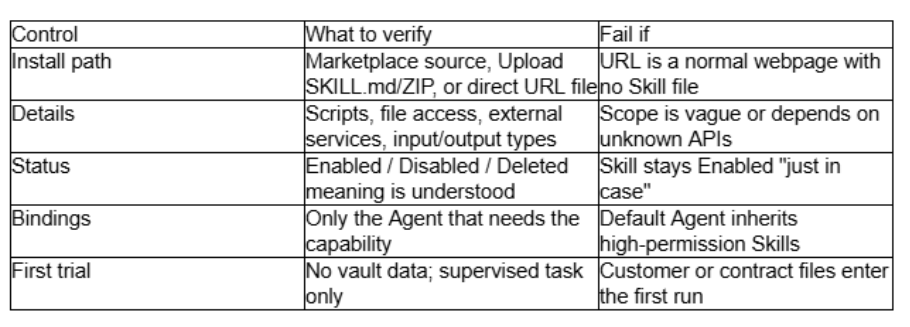
Use the table as a gate, not as decoration. If two or more rows fail, discard the package before anyone schedules it. A discarded Skill is cheaper than a wasted afternoon reconstructing who could see what.

Reject Stars As A Safety Score
Marketplace popularity metrics are references only. A heavily downloaded Skill can still ship scripts or wide file access. Community Skills are not recommended for direct production use without a source and permission review. If import fails, check format, encoding, name, description, and whether the URL points to a real Skill file. Those failures are preferable to a silent install that looked fine until someone asked where the customer table went.
Keep a one-page checklist beside the Skills sidebar: source known; version and update time recorded; Details reviewed; Agent binding minimal; Skill left Disabled until a supervised task passes; no vault data in the first trial. Finance ops can paste that list into the team wiki and refuse installs that skip a line.
Where This Still Needs A Human Constraint
Skills remain the wrong layer when the source is unknown, permissions are unclear, or sensitive data cannot be reviewed. A scheduled Agent can keep running a fixed task without asking each time, so Pause and Error statuses belong in the control story. Boundary settings help only if humans still refuse broad binds.
Use This Gate Skip The Plugin Reflex
Use an agent workspace Skill system when your team needs repeatable, reviewed capabilities with explicit Enabled/Disabled control and Agent bindings. Skip the "install everything from Explore" reflex if your desk handles contracts, customer files, or regulated numbers and nobody owns the review queue.
Ottermind earns a seat when the Skill lifecycle — Marketplace or upload, Details, Bindings, status — becomes part of your control story. If you only want faster chat without a permission model, you are shopping for the wrong category. Prove the gate on one supervised package first; expand only after the review note and the Disabled default survive a normal working week on the desk.





 Facebook
 Twitter
 YouTube