The Geometry of Motion – Mastering Keyframes Like a Math Whiz

Ever looked at a static image and thought, "This needs more vectors"? If you’re the type of person who finds beauty in the smooth interpolation of a Bézier curve, then standard mobile video editors have likely left you feeling... geometrically unfulfilled. Enter CapCut.
While many see it as a "social media app," those of us with a penchant for precision know it as a pocket-sized powerhouse for spatial manipulation. Today, we’re diving into the logic of Keyframing—the fundamental building block of non-linear animation.
The Logic of the Keyframe
In classical animation, "key" frames are the primary positions that define a movement. The computer then calculates the "in-betweens" through a process called interpolation.
In CapCut, the diamond icon is your best friend. It allows you to plot coordinates $(x, y)$ for position, scale ($s$), and rotation ($theta$). By setting two points on the timeline, CapCut executes a linear transition between those states.
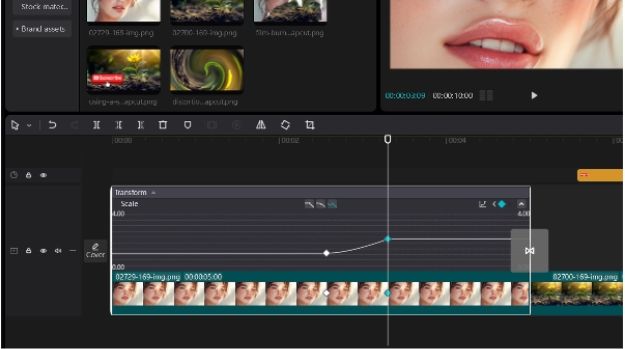
The Pro Tutorial: The "Cinematic Zoom-In"
1. Plot the Origin: Place your playhead at the start of a clip. Tap the diamond icon. This locks the current parameters.
2. Define the Vector: Move 2 seconds forward. Use two fingers to zoom in on your subject. CapCut automatically drops a second keyframe.
3. The Result: You’ve just programmed a linear zoom.
4. Nerdy Tip: Want to avoid the "robotic" look? Look for the Graphs tool after setting your keyframes. This allows you to apply "Ease-In" or "Ease-Out" functions, mimicking the physics of inertia and momentum.
Why CapCut?
It’s about Computational Efficiency. CapCut’s engine renders these transformations in real-time, even on high-bitrate 4K footage. You aren't just making a "TikTok"; you're orchestrating a series of visual algorithms that look buttery smooth.
Ready to calculate your next masterpiece?
Download CapCut for Desktop or Mobile Here and start plotting your vectors
Media Contact
Company Name: ByteDance
Email: Send Email
City: Beijing
Country: China
Website: https://www.capcut.com
If you believe this article contains misleading, harmful, or spam content, please let us know.
Report this articleMore News
View More




Recent Quotes
View MoreQuotes delayed at least 20 minutes.
By accessing this page, you agree to the Privacy Policy and Terms Of Service.