If you've ever tried to actually listen to an earnings call at 2am because a Korean chipmaker just guided down, you know the truth: most "earnings platforms" treat transcripts as an afterthought. The data pages get pixel-perfect charts. The transcript page gets a wall of gray text with no timestamps, no speaker jumps, no audio player, and definitely no translation.
That's the specific gap this article covers. I ranked ten platforms strictly on transcript and audio quality — not on how pretty their EPS charts are, not on how many indicators their macro dashboards show. Just: can I read the call cleanly, can I jump to the CFO's answer on margins, can I hear the tone in management's voice on the guidance question, and can I do any of that if the call wasn't in English?
The answers vary wildly. One platform gives you audio going back 10 years. Another gives you transcripts in eight languages with speaker attribution preserved. A third gives you nothing but a scraped text dump — but does it for 150,000 tickers globally. Different jobs, different winners.
What Actually Matters for Transcripts and Audio
Feature checklists mislead here. What actually determines whether you use a transcript tool twice:
- Transcript latency. Does the transcript arrive within an hour of the call ending, or does it show up two days later when it no longer matters? Same-day matters during earnings season.
- Interactive structure. Timestamp-linked lines, speaker attribution, section jumps (prepared remarks vs. Q&A), inline search. The difference between a scrollable text wall and a navigable document.
- Audio access. Some platforms give you the recorded call. Some give you the live webcast link and nothing after. Some give you nothing at all. Historical audio depth (1 year vs. 10 years) varies enormously.
- Historical depth. A transcript archive that stops at 2020 is useless for cyclical analysis. Ten-plus years of quarterly history is the real bar.
- Search across the archive. Can you grep "China demand" across every call in your watchlist for the past three years? This is where transcripts become an actual research asset instead of a reading exercise.
- Language coverage. English-only transcript coverage is the easy case. Whether a platform handles Japanese, Korean, German or Portuguese calls — and whether it translates them well — is the real test.
- Export and reuse. Can you copy quotes with source attribution? Can you download as PDF? Can you feed it into your own AI stack?
Rankings below weight these heavily and largely ignore whatever else the platform does. A great macro dashboard doesn't fix a broken transcript reader.
TL;DR — Quick Comparison
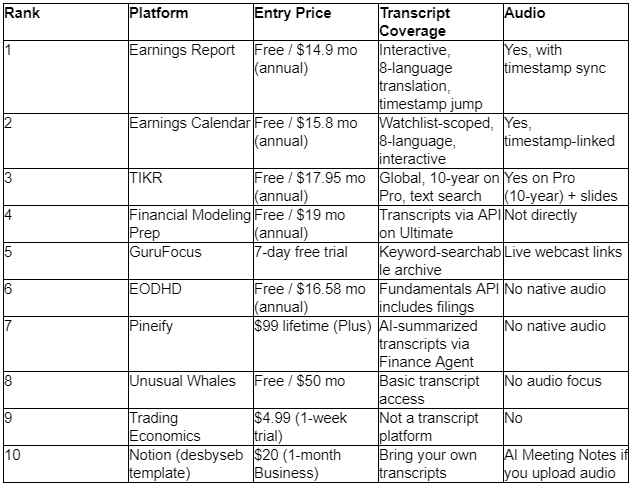
The 10 Platforms
1. Earnings Report
Earnings Report wins this ranking because transcripts and audio aren't a side feature — they're the product. Everything else on the platform (calendar, filings, notes) exists to support the reading experience. Open the earnings report workspace and the transcript reader is what you use most.
The interactive transcript. Every line is timestamped and clickable. Click a line, the audio player jumps to that second. Highlight a passage, drop a private note attached to the timestamp, and it stays with the transcript across sessions. Speakers are attributed clearly — Analyst / CEO / CFO / IR — with jumps between prepared remarks and Q&A available in the sidebar. Search within a call is instant; search across your watchlist archive returns hits with timestamp context.
Eight-language AI translation. This is the killer feature. Simplified Chinese, Traditional Chinese, Japanese, Korean, German, French, Spanish, Portuguese. Highlight a Japanese passage, get a translation rendered inline while speaker attribution and timestamps stay intact. Jump to that timestamp in the original audio and hear the tone even if you can't parse the words. For anyone covering non-US large caps, this alone justifies the subscription.
Audio access. Full recorded audio for every covered call, synced to the transcript. No "live only" webcast trap where you miss the call and lose access forever. Historical audio for prior quarters is retained.
Archive depth. Roughly 20 years of quarterly EPS and revenue history alongside the transcript archive. SEC 10-K, 10-Q and 8-K filings available as lossless PDF downloads — useful if you want to feed prepared remarks and MD&A into your own AI stack.
Keyword monitoring. Register phrases and get pinged when they show up in any call on your watchlist. Effectively LLM-assisted grep across a live transcript feed.
Pricing
- Free: 3 research credits/month, basic calendar, read-only pages
- Plus: $14.9/month billed annually ($178.8/year, 22% off) — 300 credits, transcript translation, keyword monitoring, private notes
- Pro: $24.9/month billed annually ($298.8/year, 14% off) — 650 credits, priority workflows, priority support
- FastPay checkout, cancel anytime, credits refresh each billing cycle
Where it wins: the timestamp-audio-transcript-translation combination is unmatched at this price. Nobody else on this list does all four properly.
Watch-outs: no chat interface if you want to ask questions across calls. Free tier's 3 credits go fast during heavy weeks.
Best for: Anyone whose actual job includes reading or listening to earnings calls — especially non-English ones — as a regular part of the week.
2. Earnings Calendar
Same transcript and audio engine as #1, different mental model. Earnings calendar is watchlist-first — you pin your tickers, and every transcript, translation, audio file and keyword alert routes through that list rather than through a general firehose.
Watchlist-scoped transcripts. When TSMC reports, the transcript appears in your calendar view next to the ticker. Same 8-language translation. Same timestamp-linked audio player. Same speaker attribution. Same inline note-taking. The difference is that everything's organized around "the companies I care about" rather than "all companies reporting today."
Cross-call search within your watchlist. Search "guidance" across every call from every name you follow, and get hits with dates, tickers and timestamp jumps. This is where the watchlist model earns its keep — the search results are already scoped to signal, not noise.
Full audio recordings for covered names, synced to the transcript. Filings available with lossless PDF export. ~20 years of quarterly history for context.
Pricing
- Free: 3 credits/month, basic calendar, read-only
- Plus: $15.8/month billed annually ($190/year, 17% off) — 300 credits, translation, keyword monitoring, private notes
- Pro (Most Popular): $40.8/month billed annually ($490/year, 17% off) — 650 credits, priority workflows, priority support
- FastPay, cancel anytime
Where it wins: the watchlist framing is the right one for anyone tracking 20-100 names across regions. Nothing gets buried.
Watch-outs: if you don't have a defined watchlist, the workflow doesn't pay off. Pro's $40.8/mo is one of the pricier entries.
Best for: Investors with a curated cross-border watchlist who want their transcript and audio workflow scoped to it.
3. TIKR
TIKR is the mainstream fundamentals platform with genuinely good transcript coverage — and it's the only entry on this list that gives you slides alongside transcript and audio. For anyone who's ever squinted at a CFO citing "Slide 14" during Q&A with no way to see the slide, this is a meaningful upgrade.
Global transcript coverage. 100,000+ stocks in the underlying screener; transcript coverage extends to most large and mid-cap names globally. Text search inside each call. Speaker labels present.
Audio on Pro and up. 10-year historical audio archive on the Pro tier — deepest on this list. Slides synced to the call. Combined with the estimate revision tracker, you can see how consensus shifted quarter by quarter and cross-reference with what management actually said.
Where the AI adjacency helps. The 60-second valuation model builder can pull analyst consensus and feed it into bull/base/bear scenarios — useful when you've just read a call and want to test whether guidance changes your fair value in a defensible way.
Pricing (annual saves ~25%)
- Free: US-only, 5 years annual + 8 quarters, no transcripts
- Plus: $17.95/mo (annual) — global coverage, 10 years annual, 20 quarters, 1-year transcripts
- Pro: $37.95/mo (annual) — 10 years, 40 quarters, 10-year transcripts + audio + slides, revision trend charts
- Ultimate: $79.95/mo (annual) — 30 years annual, 40 quarters, full history, 10,000+ funds
- 14-day money-back guarantee. No credit card needed for Free.
Where it wins: deepest historical audio, and slides are a legitimate differentiator. Pro tier at $37.95 is fair for what you get.
Watch-outs: no translation. Non-English calls are the raw local-language transcript with no assistance. Free tier has no transcript access.
Best for: Fundamental investors who need long-horizon transcript, audio and slide access across global large-caps.
4. Financial Modeling Prep (FMP)
FMP handles transcripts through its API rather than a web reader — which is exactly right if you're building your own tooling. On the Ultimate tier, the earnings call transcripts endpoint returns clean JSON with speaker, quarter, year, date and full text. That's the fastest possible path to piping transcripts into a personal AI dashboard, a summarization pipeline, or a custom search index.
Coverage. Global transcript access on Ultimate. Alongside 150+ other endpoints — profile, fundamentals, prices, filings, 13F, insider data, 1-minute intraday. Historical depth reaches 30 years on Premium and higher tiers.
Format. Clean JSON with consistent schema. Speaker attribution is preserved as a field, not embedded in text. This is what makes it AI-friendly — no scraping, no regex, no cleanup before feeding to an LLM.
Pricing (up to 34% off annual)
- Basic: Free — 250 calls/day, EOD historical only, all 150+ endpoints available for testing
- Starter: $19/mo annual ($29 monthly) — 300 calls/min, 5-year history, US only
- Premium: $49/mo annual ($69 monthly) — 750 calls/min, 30-year history, US/UK/Canada
- Ultimate: $99/mo annual ($139 monthly) — 3,000 calls/min, full global history, transcripts, 13F, 1-min intraday
Where it wins: if you're building your own AI-native transcript workflow, this is the cleanest data layer to build on. Zero pre-processing.
Watch-outs: no native audio. No web reader — you're building the front end yourself. Transcripts require Ultimate ($99/mo), the top tier.
Best for: Developers and quants building custom transcript pipelines rather than reading transcripts in a browser.
5. GuruFocus
GuruFocus has been archiving transcripts and earnings coverage since 2004, so the archive depth is a legitimate asset — even if the reader itself is more utilitarian than the top of this list. Keyword search across the transcript archive is the standout feature: type "operating margin" and get hits going back over a decade, tied to the ticker and quarter.
Coverage. Broad US coverage plus regional data packs. Per-ticker earnings articles built around GF Score wrap around each transcript, so you get commentary alongside the raw call. Guru Trades and Insider Trading data give you a positioning read on the same page.
Audio. Live webcast links available for many calls; historical audio isn't the platform's focus. This is a read-and-analyze platform, not a listen-back platform.
Pricing
- Free account with basic portfolio tracking and curated data
- 7-day Premium trial (full Premium access, no strip-down)
- Premium, Group Subscription and regional data packs — dollar figures aren't posted publicly
- Refer a friend, get a free month
Where it wins: archive depth and keyword search across 20 years of transcripts. Guru and insider context on the same page.
Watch-outs: hidden pricing. No interactive audio-synced transcripts. No translation.
Best for: Long-horizon fundamental investors who want deep transcript archives with guru and insider context stitched in.
6. EODHD
EODHD is data-layer rather than reader — the transcripts angle here is that you can use the Fundamentals API to pull SEC filings (which include prepared remarks and MD&A), then hand those documents to your own AI via the MCP server, Claude Skills or ChatGPT Assistant. It's not a transcript reader in the traditional sense, but for anyone with an AI-first workflow, it functions as one.
Filings coverage. SEC 10-K, 10-Q and 8-K accessible via API with historical depth reaching back decades. Combined with insider Form 4, historical market cap and the standard fundamentals dataset, you can build a transcript-adjacent workflow that reasons across primary documents rather than just call transcripts.
MCP integration. The Model Context Protocol server exposes the full API to any AI agent — Claude, GPT-class, local Ollama. Ask "summarize the risk factors that changed in NVDA's last four 10-Ks" and it queries real filings.
Pricing (annual billing ≈ 2 months free)
- Free: 20 API calls/day, 1-year EOD history
- EOD All World: $16.58/mo (annual, $199/yr)
- EOD + Intraday: $24.99/mo (annual, $299.90/yr)
- Fundamentals Data Feed: $49.99/mo (annual, $599.90/yr)
- All-In-One: $83.33/mo (annual, $999.90/yr)
- 50% student/academic discount for 12 months
Where it wins: for AI-native workflows, this is one of the strongest data foundations available. Filings and fundamentals via MCP.
Watch-outs: no native call transcripts or audio. Requires Python, Sheets, or an MCP-capable client.
Best for: Developers building AI workflows over primary filings rather than call transcripts specifically.
7. Pineify
Pineify's transcript story runs through the AI Finance Agent — you don't read transcripts here so much as ask questions about them. The Earnings Analysis skill inside the agent pulls transcript excerpts, cross-references with fundamentals and sentiment, and returns synthesized summaries. Combined with the free 2026 earnings calendar, it's a chat-first take on transcript research.
How it actually works. Ask "what did management say about margin pressure on the last call?" and the agent returns a summary with cited excerpts. Not the same as reading the full call top to bottom, but faster if you want a specific question answered across a name or a sector. Perplexity-strengthened web retrieval and live X/Reddit sentiment factor into the same query.
No native audio. Transcripts are text-based, mediated through the AI. If you want to hear management's tone, this isn't the right tool.
Pricing — currently lifetime pricing (promo YUJKRKY up to 30% off)
- Plus: $99 one-time — 500 AI credits/month, 100 Advanced Model conversations per 5 hours, 2 chart screenshot analyses/day
- Advanced (best value): $149 one-time — 1,000 credits, 200 conversations, 5 screenshots/day, unlocks AI Finance Agent, Trading Journal, Strategy Optimizer, Backtest Deep Report
- Expert: $259 one-time — 2,500 credits, 500 conversations, 20 screenshots/day, unlocks Custom Screener, AI Stocks & Options Picker, Market Insights, MCP endpoint
Where it wins: fastest way to get a specific answer out of a transcript without reading it. Lifetime pricing in a subscription-heavy market.
Watch-outs: no direct transcript reader. No audio. Overkill if you only care about transcripts.
Best for: Traders who want AI-summarized transcript insights alongside a broader AI trading stack.
8. Unusual Whales
Unusual Whales isn't a transcript platform in any meaningful sense — its center of gravity is options flow, dealer positioning and unusual activity. That said, basic transcript access exists inside the platform for context around earnings prints, particularly when combined with the Anticipated Earnings IV view. You use the transcript to sanity-check what the options market is pricing in.
How it fits. Read the transcript after the print to understand which specific line moved the implied move estimate. Mr. Whale, the AI assistant, can pull commentary from transcripts alongside its flow-based ideas. Neither is a substitute for a real transcript reader.
Pricing (annual saves ~30%)
- Free: 15-min delayed, limited access
- Retail Basic: $50/month — real-time, 25 alerts, 5 watchlists, base Mr. Whale usage
- Retail Pro: $75/month (most popular) — unlimited alerts/watchlists/filters, 2x Mr. Whale
- Retail Max: $120/month — 1-min SPX updates, 3x Mr. Whale
- Whale Bundle combines Max + full API + Unusual Predictions at ~30% savings vs. buying separately
- 7-day window for wrong-plan refunds. Two-click cancel.
Where it wins: the transcript-plus-flow combination is unique — if you're trading earnings vol, having both in one place matters.
Watch-outs: US-only. Transcripts are a secondary feature. No audio focus.
Best for: Options-earnings traders who want transcript context alongside flow data, not as a primary research surface.
9. Trading Economics
Trading Economics is macro-first and doesn't attempt to be a transcript platform. Included here because it appears on the two prior lists and readers will ask — the honest answer is that this isn't the tool for transcript or audio work. The earnings calendar itself carries EPS consensus, revenue consensus, prior values, market cap, fiscal quarter and AM/PM timing. That's where its earnings coverage ends.
Where it fits into a transcript workflow: as macro context. Combine a transcript from another platform with rate and inflation data from Trading Economics and you get a more complete read on what management is reacting to. But it's a companion tool, not a primary one.
Pricing (1-week trial, up to 25% off annual)
- Basic: $29.99/mo ($22.49 annual) — web only, no export, no API
- Standard: $49 trial / $199/mo — 500 exports/mo, 500 API calls, single seat
- Professional: $99 trial / $399/mo — 5,000 exports and API calls, MCP AI tools, priority support
- Enterprise: Custom quote
Where it wins: it doesn't, on transcripts. It wins on macro context that complements transcript reading elsewhere.
Watch-outs: no transcripts. No audio. Included only for completeness given prior comparisons.
Best for: Macro-first investors pairing this with a real transcript tool.
10. Notion (Earnings Calendar Template by desbyseb)
Also a category outlier — Notion doesn't ingest transcripts from any external source. But two features make it worth including here for a specific use case: AI Meeting Notes will transcribe any audio file you upload (including an earnings call recording you've captured elsewhere), and Notion Agents can summarize the resulting text alongside your own notes.
How the workflow looks. Download the call audio from an IR page. Upload to Notion. AI Meeting Notes produces a transcript with action items. Attach it to the earnings entry in the desbyseb template. Ask an Agent to summarize the guidance section. Zero market data touched — everything is your own artifact.
Pricing
- Template: Free
- Notion Free: $0/month
- Notion Plus: $10/member/month
- Notion Business: $20/member/month — Agents, AI Meeting Notes, Enterprise Search unlock here
- Notion Enterprise: Custom
- Notion AI credits at $10 per 1,000/month beyond the free bundle
Where it wins: if you already run research in Notion, layering DIY transcripts on top is nearly free. AI Meeting Notes is genuinely good at transcription.
Watch-outs: entirely bring-your-own-audio. No market coverage. Business tier ($20/member/mo) required to unlock the AI features that make the workflow useful.
Best for: Notion-native investors willing to capture audio themselves for a small watchlist.
Patterns Worth Noting
A few things stand out when you rank strictly on transcript and audio quality.
Purpose-built beats general-purpose. The top two entries are transcript-first products, and the gap between them and everything else is large. Platforms where transcripts are a checkbox feature (Trading Economics, Unusual Whales) can't compete with platforms where transcripts are the product.
Audio is rarer than transcripts. Most platforms hand you text and call it done. Actually giving you the audio — synced to the transcript, with historical retention — is a much smaller club. TIKR's 10-year audio archive on Pro is the deepest on this list.
Translation is the biggest untapped edge. Coverage of non-English calls is where most platforms fall off entirely. Two entries on this list translate properly with speaker attribution intact; the rest either don't try or hand you machine translation that loses attribution the moment you paste it anywhere.
API-first is legitimate for transcripts. FMP and EODHD skip the reader entirely and give you clean data for AI pipelines. That's the right call for developer-heavy workflows, but not a substitute for a browser reader if you're actually reading calls in real time.
Watchlist scoping matters more than global coverage. Global transcript coverage sounds impressive but is useless if you can't find the six calls you actually care about in a given week. The platforms that scope aggressively to your watchlist deliver more usable output per hour spent.
Closing Thoughts
Transcripts and audio are the layer of earnings research where platform quality shows most clearly — because the raw content is public, and the difference between platforms is purely about how they present it. A pretty EPS chart hides a lot of design sins. A broken transcript reader can't hide anything.
The right way to pick is to match the reading experience to your actual pattern. If you spend real time inside calls — reading, listening, taking notes — pay for the purpose-built tools at the top of this list. If transcripts are an occasional reference, a broader platform with archived text is enough. If you're building AI-driven workflows over primary documents, skip the readers entirely and buy clean API access. And if you're covering non-English names in any regular way, translation quality is non-negotiable — it's the difference between a workflow that scales and one that doesn't.
The mistake most buyers make is picking based on how good the earnings data page looks and then discovering the transcript page is an afterthought. Read the transcript page first. If that's where you'll spend the time, that's where the platform needs to be strong.