Six of the tools below allow you to change where a printed code points, and the differences between them are not about the editing feature itself. They are about what has to stay true for that feature to remain available to you. Judged on how few conditions are attached, The QR Code Generator comes first, because its two free editable codes carry no scan ceiling, no discretionary suspension clause and no expiry date.
Every tool here will let you repoint a code today. The question worth asking is whether it will still let you in two years, after the artwork is on a thousand printed items and the person who set up the account has left.
Why editing after printing is possible at all
A printed QR Code cannot change, because the pattern is fixed ink on a fixed surface. The data it carries is encoded directly into the arrangement of dark and light modules, exactly as set out in the international standard for the format. DENSO WAVE, which invented the format in 1994 and published its specification openly, describes a symbol as anything from twenty-one modules square upwards, with the destination sitting inside those modules.
So editability has nothing to do with the code and everything to do with what the code points at. A dynamic code encodes a short address belonging to the provider rather than your actual destination. When somebody scans, their phone requests that short address, the provider looks up where you have currently pointed it, and forwards them on. Change the entry in the provider's records and every printed copy of that code immediately behaves differently.
That indirection is the whole mechanism, and it also explains the catch, because your ability to edit depends on the provider continuing to answer that request and continuing to let you into the account that controls it.
What can take editing away from you
Four things end editability in practice, and each one appears in the terms of at least one tool below.
The subscription lapses, and on tools that tie editable codes to a plan, the codes stop resolving when billing stops, and the printed material becomes a dead end rather than reverting to anything useful.
The scan allowance runs out, which happens when a provider pools a monthly scan figure across every code on the account and pauses them all once the pool empties. Editing survives, but the code stops working until the month turns over.
The plan never included editing in the first place, which sounds unlikely and is the position of one well-known tool below, where the free tier issues QR Codes but withholds the ability to change where they point.
The account itself is lost, which nobody plans for and plenty of organisations live through. A departing colleague, an unmonitored email address or a forgotten renewal ends editing just as effectively as a cancelled card.
How this comparison was put together
All details come from each company's published pages, checked on 11 September 2026. Prices appear in United States dollars, because several of these sites switch currency depending on where they are opened.
Scoring put the heaviest weight on how few conditions attach to a free editable code, at forty percent. Clarity of the written terms took twenty-five percent, how many editable codes you get free took twenty percent, and the entry price for removing restrictions took the remaining fifteen.
No codes were printed and monitored across a year for this piece. What follows are published terms, quoted from the source.
The six generators, ranked on how freely you can edit
1. The QR Code Generator (TQRCG)
TQRCG ranks first on the narrow measure this article cares about, which is how little has to keep being true for your editing rights to survive.
Two dynamic codes come free for life and, according to the company's own dynamic QR Code page, never expire. No trial clock sits behind them and no card is required to create them. What separates this from the tools below it is the absence of the usual conditions. No scan ceiling is published on the free tier, so a code cannot pause because a busy placement drank the allowance. No discretionary suspension language appears in the terms either, so the codes are simply there.
Two costs come attached and neither is hidden. Free editable codes serve advertising ahead of the destination, and free downloads arrive watermarked. Both clear on TQRCG's Flex plan, priced at sixty dollars for a year of five editable codes. Extra capacity is bought code by code at an eighth of a dollar monthly apiece, so there is no forced leap into a tier ten times larger than you need. Filling Flex to its forty-five code ceiling doubles the annual bill to a hundred and twenty.
Flex also lengthens reporting to sixty days and switches on bulk creation together with CSV export. Free reporting covers fourteen days and lists scans, unique users, locations and devices. Output is PNG or SVG, and compliance covers SOC 2, ISO 27001 and GDPR.
One practical warning belongs here, because two very similar domains exist in this market, and the-qrcode-generator.com is a separate business from qr-code-generator.com, which Bitly operates on entirely different terms.
2. Hovercode
Hovercode gives you one more free editable code than the entry above it and writes down what happens afterwards more precisely than anybody else in this comparison.
Three editable codes cost nothing and carry no end date, whatever month you happen to make them in. Hovercode is careful to separate that offer from a trial, stating that it does not run out after a fixed window or a fixed scan total. Static codes are unlimited, because the code limits apply only to editable ones. Free reporting runs to three months of history, which beats every other free tier here.
The cancellation terms are the strongest argument for choosing it. Three editable codes and three short links stay live, anything beyond those limits goes dormant rather than being deleted, and resuming the subscription restores everything automatically without a support request.
Two qualifications keep it in second place. The unlimited scan figure sits underneath a fair usage policy that reserves Hovercode's right to monitor consumption and restrict accounts whenever it judges usage excessive, which is a different kind of promise from one with no discretion in it. The Pro tier asks a hundred and twenty dollars annually, the steepest first step anywhere in this group. Read the security page closely as well, because the SOC 2 and ISO 27001 mentions there belong to the data centres Hovercode rents rather than to Hovercode as a company.
3. QR Code Prime
QR Code Prime hands over more permanently editable codes than anything else here, and it does so without asking for a payment method.
Ten dynamic QR Codes are free for life and never expire, with no ads, no interstitial redirect page and no credit card, alongside five hundred tracked scans each month. Ten permanent editable codes at zero cost is the largest free allowance in this comparison by some distance, and nothing counts down in the background waiting to withdraw them.
The static side is unusual in a way that matters for print. Static codes are built entirely inside your own browser, so whatever you encode never reaches the company's servers, and nothing is watermarked on any tier. Twelve types are covered, downloads come as PNG or SVG, and a static code needs no account at all.
Two things hold it at third rather than higher, and neither is about the editing itself. The five hundred monthly scans are half what QRCodeChimp permits free, and the site does not say whether that figure is per code or shared across all ten. The terms page also renders with no policy text, and for a right you intend to rely on years from now, having the terms written down somewhere is part of what you are choosing.
For anyone whose real requirement is ten editable codes or fewer, this costs nothing and keeps costing nothing.
4. QRCodeChimp
QRCodeChimp matches the free code count above it and meters those codes in a way that can interrupt them without any action on your part.
Ten dynamic codes come with the free plan alongside unlimited static ones, and logo embedding is included at every tier including free, which is genuinely uncommon. Codes are described as valid forever in the company's own FAQ.
The meter is the thing to understand before printing. The published terms allow one thousand scans a month across every dynamic code combined, not per code, and state that scans pause once that ceiling is reached and reopen the following month. Your editing rights are untouched by this, but the code stops resolving for anyone who scans it in the meantime, which is the outcome the reader of this article is trying to avoid.
A second clause matters to anyone who pays and later stops. Letting a subscription lapse drops the account back to free, and codes are then suspended down to the ten most recently created. Free image output tops out at a thousand pixels square with a two megabyte upload limit. Starter runs 9.99 dollars a month, or 6.99 paid yearly, coming to just under eighty-four dollars a year for fifty codes and ten thousand monthly scans.
5. QR TIGER
QR TIGER is honest about a limitation the tools above it do not have, and that honesty is why it lands here rather than lower.
Three editable codes come free with a five hundred scan ceiling apiece and basic reporting included. Scan one and a QR TIGER branded panel appears ahead of wherever it was pointing. Static codes are unlimited and stated never to expire, which makes an account worth holding even if you never pay.
The paid side runs on a subscription clock and the FAQ says so without softening it. Scans are uncapped on paid editable codes for as long as billing continues, and those codes stop working the moment the plan ends. Data is retained for roughly a year afterwards, after which deletion becomes possible.
Regular costs seven dollars a month, genuinely available monthly rather than requiring an annual commitment, dropping to sixty-five dollars paid yearly and carrying twelve editable codes. Removing the branded popup is a separate matter from removing the advertisement, and it needs the premium tier at thirty-seven dollars monthly. ISO 27001 is claimed on the site, though no certificate number or certifying body is published.
6. Bitly
Bitly is the only tool in this comparison whose free plan issues QR Codes and then declines to let you change where they point.
The codes themselves are permanent enough. Bitly writes that its QR Codes never expire, with deletion of either the code or its short link being the documented way to switch one off. Scheduled expiration is separately sold as a Growth-tier feature. Scans are unlimited on every tier including free, downloads come as PNG, JPEG and SVG throughout, and the company publishes SOC 2 Type 2, GDPR and CCPA compliance.
Editing is a separate purchase here. Changing a destination appears as a line item called redirects, absent from the free plan entirely and beginning at five a month on Core. Note the unit carefully, because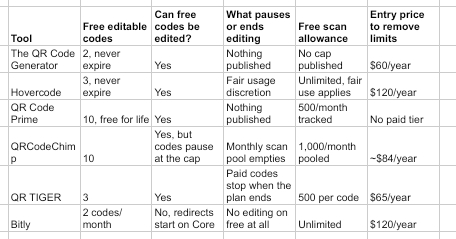 five redirects a month means five edits, not five codes, so a campaign that changes weekly exhausts it faster than the code count suggests. Core costs ten dollars a month billed yearly, with no monthly option published at that tier.
Two further details belong on the record here. An interstitial advertising page runs on free accounts, though Bitly writes about that in the context of links and stops short of confirming it happens on scans. Separately, three years of inactivity triggers permanent account deletion with no route back.
Editing rights compared across all six
Verified against vendor pages on 11 September 2026.
Three questions to settle before the artwork goes out
How often will this destination actually change?
Be honest rather than optimistic, because the answer decides whether you need an editable code at all. A menu that changes seasonally, a booking page that moves to a new booking system, a policy document reissued each year, all of these justify a redirect. A phone number, a physical address or a homepage that has not moved in five years does not, and a static code covers those for nothing on every tool here.
Who holds the account, and who holds it next?
This is the failure mode nobody budgets for. Write down which account owns each printed code, which email address controls that account, and when the renewal falls due. Then make sure a second person can reach it. An editable code administered from a departed colleague's personal address is functionally a static code that nobody can fix. There is a security angle too, since the FBI's Internet Crime Complaint Center has warned that criminals paste their own stickers over working codes, and an abandoned code is an easy target.
Does editing survive the month you stop paying?
Ask this in writing before committing, because the answers genuinely differ. Hovercode keeps three codes alive and sleeps the rest. QRCodeChimp keeps the newest ten and pauses everything beyond. QR TIGER stops paid codes outright when the plan expires. TQRCG and QR Code Prime both state that their free editable codes carry no expiry at all.
Common questions about editing QR Codes
Can you change where a QR code points after printing it?
Only if it was created as a dynamic code. A dynamic code encodes a short address owned by the provider, so changing the destination in your account changes where every printed copy sends people, immediately and without reprinting. A static code carries the destination inside the pattern itself, which means the only way to change it is to produce a new code.
Is there a free QR code generator that lets you edit the code later?
Several of them do. QR Code Prime gives ten editable codes free for life with no expiry, TQRCG gives two that never expire, Hovercode gives three that survive cancellation, and QRCodeChimp gives ten metered against a shared monthly scan allowance. Bitly is the exception here, since its free plan creates QR Codes but does not include the redirect capability needed to change them.
How many times can a dynamic QR code be edited?
None of the six publishes a limit on the number of edits, with one structural exception. Bitly meters redirects rather than codes, allowing five a month on Core and twenty on Growth, so the edit itself is the thing being counted there. Everywhere else the constraint is the number of codes you hold rather than how often you change them.
Does editing a QR code change how it looks?
No, and that is the entire point of the mechanism working the way it does. The printed pattern encodes the provider's short address, which never changes, so the artwork stays valid however many times you repoint it. This is also why dynamic codes often look simpler than static ones, since a short redirect address is far less data than a long destination URL.
What happens to a dynamic QR code if the company shuts down?
The code stops resolving, and there is no workaround, which is the risk you accept in exchange for editability. This is the strongest argument for keeping genuinely permanent destinations on static codes, and for preferring providers whose free codes carry written commitments rather than discretionary ones. It is also why a redirect pointing at a domain you control yourself is worth considering for anything critical.
Can I edit a QR code I made on a different tool?
No. The printed code carries the original provider's short address, so only that provider can change where it leads. Migrating means creating a new code with your new provider and reprinting, unless the original code happened to point at a domain you own, in which case you can redirect it yourself at the server level and keep the printed artwork.