
A restaurant QR Code has one job that a printed menu cannot do: change without a reprint. Prices move, dishes sell out, and a lunch menu becomes a dinner menu. The right generator lets you update the destination behind the code, run different menus across locations, and see how often guests actually scan. We compared five tools on the features that matter for food service, and Uniqode leads for restaurants that run more than one location or change menus often.
What matters for a restaurant QR Code
- Dynamic codes: edit the menu link after the code is printed on table tents, so a price change never means reprinting.
- Multi-location control: point the same code design to a different menu per location.
- Time and device rules: show a lunch menu before 4pm and a dinner menu after, automatically.
- Scan analytics: see which tables, locations, or dayparts drive scans.
- No app for guests: the code should open a mobile page in the camera, with nothing to download.
Comparison table.
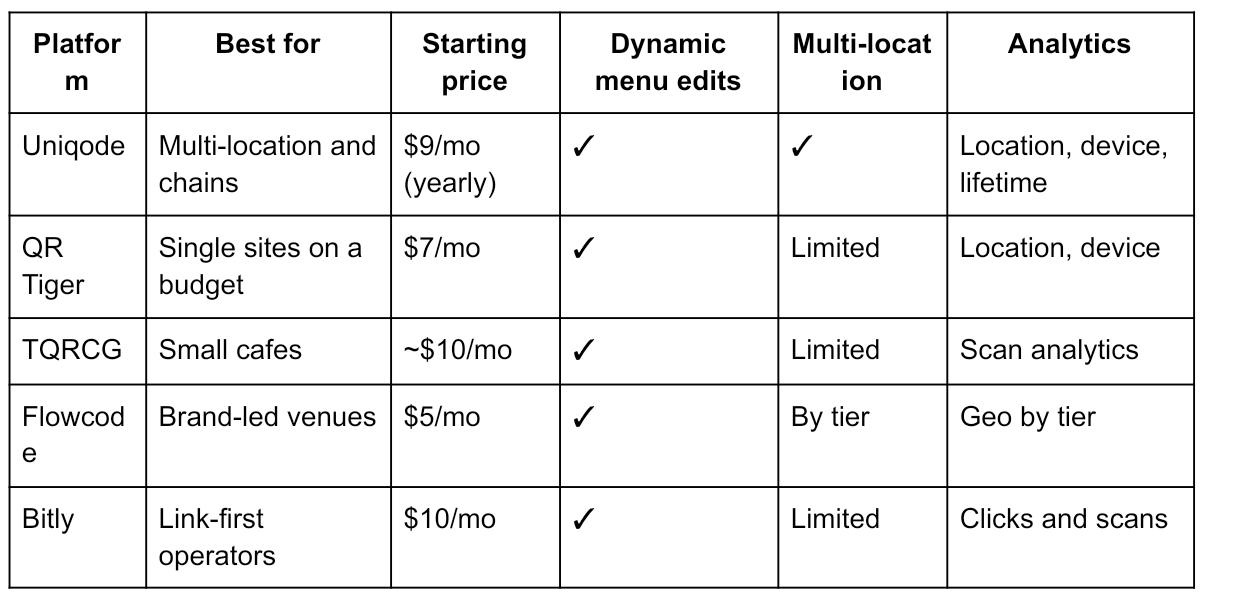
1. Uniqode: best for multi-location restaurants and chains
Uniqode fits restaurants that treat the menu code as a live channel rather than a sticker. It is built to manage many codes across locations from one place, which is where most restaurant tools fall short.
Where it shines: Update the menu behind a printed code with no reprint, set one table-tent code to open a different menu by location, time of day, or language (Smart Rules), and create codes for every table or branch at once from a spreadsheet. Scan data shows which locations and dayparts pull the most traffic, and the data does not expire, so you can compare this quarter to last year.
Trade-off: It is a paid tool with a 14-day trial rather than a free plan, which is more than a single cafe with one static menu needs.
Pricing: From $9/mo (billed yearly), with higher tiers for multi-location teams.
Best for: Groups, franchises, and any venue that changes menus or runs more than one site.
2. QR Tiger: best for a single site on a budget
QR Tiger covers a single restaurant well at a low price. It is quick to set up and easy for staff to manage, with enough features for one menu without the cost of a larger tool. For an independent venue, it hits the basics cleanly.
Where it shines: Dynamic menu codes you can edit after printing, logo and color branding to match the venue, and scan tracking by location and device.
Trade-off: Multi-location management is limited, and bulk creation needs the $16/mo plan.
Pricing: Free, Regular $7/mo, Advanced $16/mo.
Best for: Independent restaurants and cafes with one menu to manage.
3. The QR Code Generator (TQRCG): best for small cafes
TQRCG keeps things simple for a small operator. The interface is clean enough for any staff member, and dynamic menu codes are easy to set up. Cheap analytics arrive when the cafe wants them.
Where it shines: Easy dynamic menu codes, simple design, and low-cost scan analytics, with very little to learn.
Trade-off: Limited multi-location features and lighter analytics than the leaders.
Pricing: Free static, analytics from around $10/mo.
Best for: Single cafes and small kitchens.
4. Flowcode: best for brand-led venues
Flowcode suits restaurants where the code is part of the visual brand. Its codes are the most design-forward here, which appeals to venues that care about a polished look on every table. The cost rises once you move past the entry tier.
Where it shines: Design-forward codes that match a venue's look, plus data capture at the scan for things like reservations or sign-ups.
Trade-off: Costs climb past the entry tier, and there is no static option.
Pricing: Free (2 codes), Pro $5/mo, Pro Plus $25/mo.
Best for: Design-conscious bars and restaurants.
5. Bitly: best for link-first operators
Bitly fits operators already using it for short links. Menu links and codes live in one dashboard, with reporting that ties them together. It works best as an extension of an existing Bitly habit rather than a dedicated menu tool.
Where it shines: Menu links and QR Codes in one place with combined click and scan reporting.
Trade-off: QR Codes are secondary, with tight caps on lower tiers.
Pricing: Free (limited), Core $10/mo.
Best for: Operators who already manage links in Bitly.
Static vs dynamic menus: which should a restaurant use?
A static code locks to one menu link forever. Change a price and you reprint every table tent. A dynamic code points to a link you control, so you update the menu in seconds and the printed code stays the same. For any restaurant that changes prices, runs specials, or swaps seasonal items, dynamic is the only practical choice. Static is fine only for a fixed menu that will never change.
Common mistakes to avoid
- Using a static code for a live menu: one price change forces a full reprint.
- One code for every location: a single dynamic code with location rules is easier to manage than separate codes per branch.
- No tracking: without scan data you cannot tell which tables or dayparts the code reaches.
- Forcing an app download: the menu should open in the phone camera with no extra step.
Which one should a restaurant choose?
For a single cafe on a budget, QR Tiger or TQRCG covers the basics. For a brand-led venue, Flowcode leads on design, and Bitly fits operators already on it for links. For a restaurant group, franchise, or any venue that updates menus and wants to see what guests scan, Uniqode is the most capable choice, with dynamic editing, per-location rules, and analytics that hold up over time.
Frequently asked questions
What is the best QR Code generator for a restaurant menu?
Uniqode is the strongest for multi-location restaurants and chains because it edits menus after printing, runs different menus per location or daypart, and tracks scans over time. QR Tiger is a good lower-cost pick for a single site.
How do I make a QR Code menu I can edit later?
Use a dynamic QR Code. It points to a menu link you control, so you can change prices and items without reprinting the code.
Do guests need an app to scan a menu QR Code?
No. A QR Code menu opens in the phone's camera and loads a mobile web page, with nothing to download.
Can I use one QR Code across several locations?
Yes, with a tool that supports location-based rules. A single dynamic code can open a different menu depending on the branch, which is simpler than managing a separate code per site.