CHARLOTTE, N.C., October 7, 2026 - ITDock, a modern IT documentation platform built for managed service providers and IT teams, announced an expansion of its platform with new deployment options and technician-focused workflow tools designed to make documentation easier to create, maintain and use during everyday IT work.
The latest additions include a self-hosted edition of ITDock, Project Mode for capturing documentation while technical work is being performed, QR-based asset tracking, expanded AI-assisted documentation tools, network diagrams and improved client onboarding workflows.
The updates reflect ITDock's focus on reducing the amount of time technicians spend switching between disconnected documentation, ticketing and administrative workflows.
"Documentation is most useful when it fits naturally into the work technicians are already doing," said Adam Capehart, founder of ITDock. "Our goal with ITDock is to remove as much friction as possible between doing the technical work and leaving behind useful documentation for the next technician."
More information about ITDock is available at ITDock.io.
Self-Hosted Deployment Gives IT Teams More Control
ITDock now offers both cloud-hosted and self-hosted deployment options.
The self-hosted edition is designed for MSPs and IT organizations that prefer to operate documentation infrastructure within environments they control. Organizations can maintain their own ITDock installation while retaining access to the platform's client documentation, credential management, device records, network diagrams, knowledge base and technician workflow features.
The addition gives organizations another option when internal policies, customer requirements or infrastructure preferences make self-hosting desirable.
Project Mode Captures Documentation While Work Happens
One of ITDock's newer workflow features, Project Mode, is designed around a common problem in IT services: valuable technical knowledge is often lost after a migration, deployment or troubleshooting session is completed.
Technicians can open a project for a client and capture notes, screenshots, configuration decisions and troubleshooting information while the work is underway. The resulting information can then be structured into reusable documentation for the rest of the team.
Rather than treating documentation as a separate administrative task after technical work is finished, Project Mode is intended to make documentation part of the workflow itself.
QR Asset Tracking Connects Physical Devices to Documentation
ITDock has also expanded its asset-management capabilities with QR-based asset tracking.
Organizations can generate QR codes for documented equipment and attach them to physical devices. When an authorized technician scans a code, ITDock can direct the technician to the corresponding device record, providing faster access to the documentation associated with that asset.
The feature is designed for MSPs and IT departments managing servers, workstations, firewalls, switches and other equipment across multiple locations.
AI-Assisted Documentation and Technician Support
ITDock continues to expand its use of AI within documentation workflows.
The platform includes tools for converting screenshots and working notes into structured documentation, generating procedures and assisting technicians with troubleshooting questions.
ITDock's built-in IT Assistant can also work with relevant client and device context, allowing technicians to ask technical questions while working within a documented customer environment.
Additional information about these and other capabilities is available on the ITDock features page.
A Lightweight Approach to MSP Documentation
ITDock is positioned as a lightweight alternative for MSPs and IT teams that want structured documentation without adopting a large, complex platform.
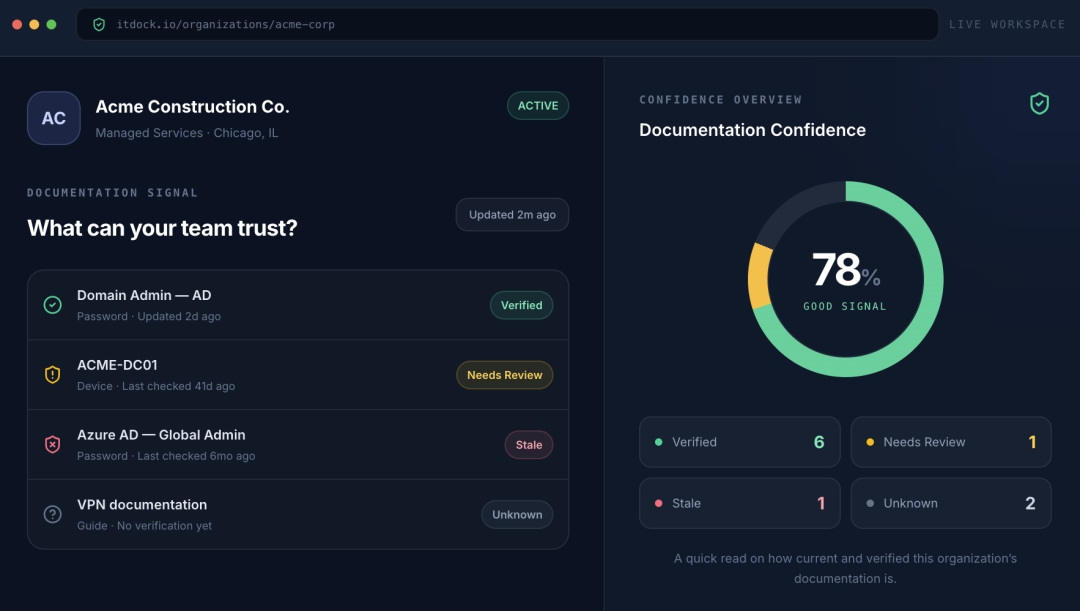
The system organizes client environments around documentation technicians regularly need, including credentials, devices, contacts, procedures, network information and knowledge base content.
ITDock also offers features including global search, client onboarding, network diagrams, secure credential storage and browser and mobile access.
The company continues to develop the platform around technician workflows while maintaining a focus on simplicity and accessibility for smaller and growing IT service organizations.
MSPs evaluating documentation platforms can also review ITDock's IT Glue alternatives guide for a detailed look at documentation approaches and available options.
About ITDock
ITDock is an IT documentation platform designed for managed service providers and IT teams. The platform helps technicians organize client documentation, credentials, devices, procedures, network information and operational knowledge in a searchable workspace.
ITDock is available as both a cloud-hosted service and a self-hosted deployment, with plans designed for individual technicians and growing IT teams.
For more information, visit ITDock.io.
Media Contact
Company Name: ITDock
Contact Person: Adam Capehart, Founder
Email: Send Email
Country: United States
Website: ITDock.io